
How Restaurants Track Orders Live Without Delivery Apps

How Restaurants Track Orders Live Without Delivery Apps
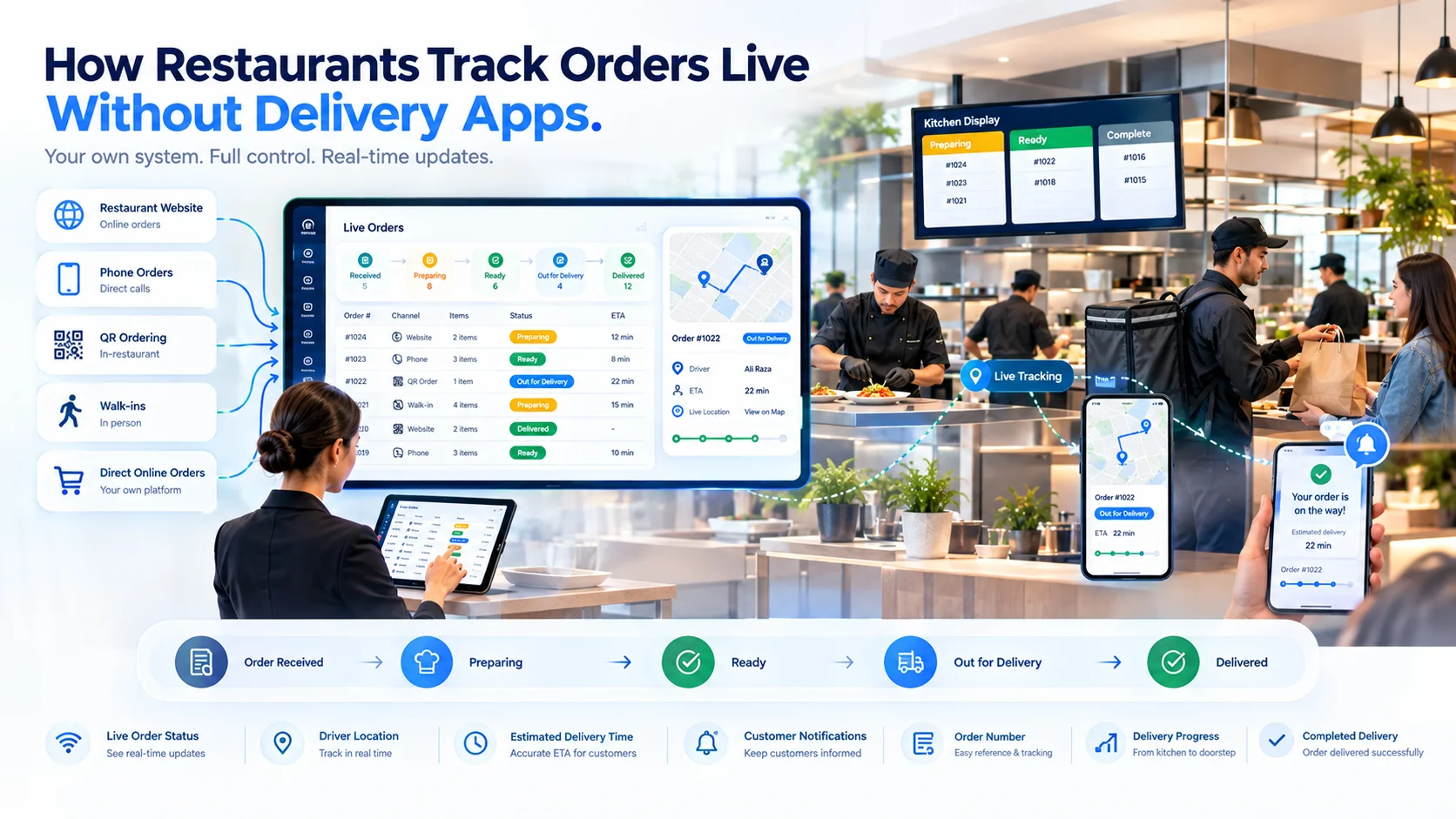
Restaurants do not need to rely on third-party delivery applications to give customers live order updates. A restaurant can accept an order through its website, QR menu, POS, telephone or WhatsApp-assisted channel and provide tracking through a secure web link. The customer opens the link in a browser to see whether the order has been accepted, is being prepared, is ready for collection or is out for delivery. Behind the customer-facing page, restaurant employees update the order through the POS, kitchen display and rider workflow. This approach allows restaurants to track direct orders while keeping the ordering, customer communication and fulfilment process connected to their own operation.

Quick Answer

Restaurants can track orders live without delivery apps by assigning each order a unique tracking link and connecting that link to order-status updates from the POS, kitchen and delivery workflow. The process normally follows this sequence: Order placed → Tracking link created → Restaurant accepts order → Kitchen updates preparation → Order marked ready → Rider or collection status updated → Order completed Customers can open the tracking link through a normal web browser. They do not need to download a mobile application or create an account unless the restaurant’s system specifically requires it.

What Does “Without Delivery Apps” Mean?

The phrase can have two meanings. First, a restaurant may want to process direct orders without depending on a third-party delivery marketplace. Second, a restaurant may want customers to track orders without installing a dedicated mobile application. A browser-based tracking system can support both situations. The restaurant manages the order through its own connected system, while customers receive a link through SMS, email, WhatsApp or the order-confirmation page. The tracking page can show updates for:
  • Takeaway orders
  • Restaurant-managed deliveries
  • Scheduled collections
  • Website orders
  • Telephone orders
  • QR menu orders
  • WhatsApp-assisted orders
The restaurant still needs an internal system to control the order. What it does not necessarily need is a separate consumer application installed on the customer’s phone.

How Live Restaurant Order Tracking Works

Live order tracking connects internal restaurant events with a customer-facing status page. Every time an authorized employee changes the order status, the tracking page receives the updated information. For example:
Restaurant Action Customer-Facing Update
Restaurant accepts the order Order confirmed
Kitchen begins preparation Preparing your order
Kitchen completes the items Ready for collection or packing
Rider receives the order Rider assigned
Rider leaves the restaurant Out for delivery
Customer receives the order Delivered
The customer does not need access to the restaurant’s internal dashboard. The tracking page displays only the information associated with that order.

Step 1: Accept Orders Through Direct Channels

The process begins with an order entering the restaurant’s own operational workflow. Direct orders may come from:
  • The restaurant website
  • An online ordering page
  • A QR code menu
  • A POS terminal
  • A self-service kiosk
  • A telephone call
  • WhatsApp
  • An employee-created order
  • A scheduled-order form
Telephone and in-person orders can also receive tracking links if the restaurant records the customer’s mobile number or email address. All supported channels should create an order inside the same order management system. This gives the kitchen, cashier, manager and delivery team access to one shared order record.

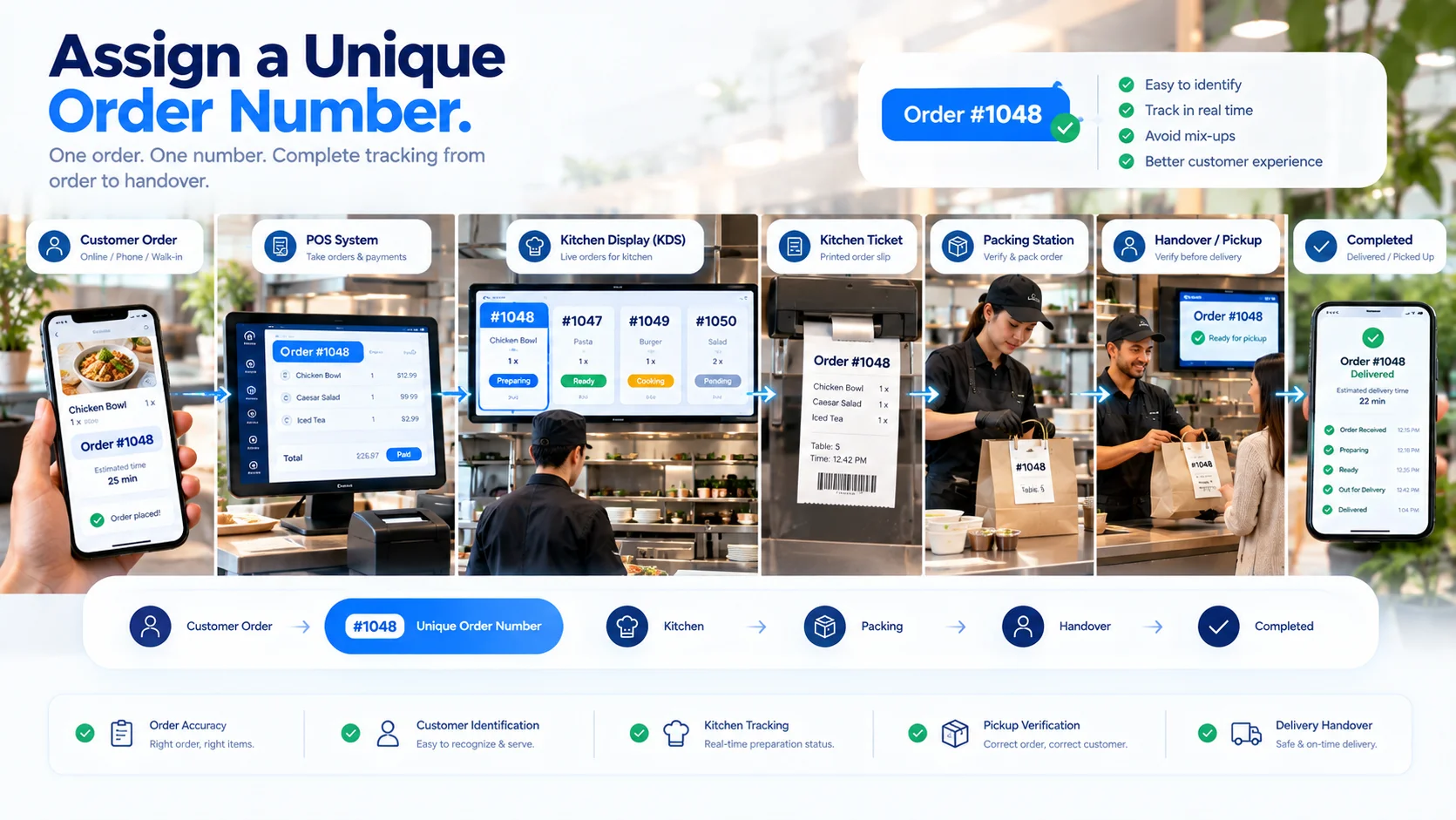
Step 2: Assign a Unique Order Number

Assign a Unique Order Number Every order should receive a unique reference. The order number helps connect:
  • Customer details
  • Ordered items
  • Kitchen tickets
  • Payment status
  • Collection information
  • Rider assignment
  • Tracking events
  • Final transaction records
A multi-branch restaurant may include a branch identifier in the order number so employees can immediately recognize which location owns the order. The customer-facing reference should be easy to read, while the system may use a separate secure identifier inside the tracking URL.

Step 3: Generate a Secure Tracking Link

After the order is created, the system generates a link for that specific order. A customer may receive a link similar to: restaurant.com/track/secure-order-reference The customer opens the page through a phone, tablet or computer browser. A tracking link should not expose sensitive information through a predictable order number alone. Restaurants should use secure, difficult-to-guess references and limit the personal information displayed on the page. The tracking page may show:
  • Restaurant or branch name
  • Order number
  • Order type
  • Current status
  • Estimated completion time
  • Ordered items
  • Collection instructions
  • Delivery progress
  • Restaurant contact information
Only information required for tracking should be visible.

Step 4: Send the Tracking Link to the Customer

The link can be delivered through the customer’s preferred communication channel. Common options include:
  • SMS
  • Email
  • WhatsApp
  • Order-confirmation page
  • Printed QR code
  • Digital receipt
For an online order, the customer may see the tracking button immediately after checkout. For a telephone order, an employee can enter the customer’s mobile number and send the link after confirming the order. The message should explain what the link does. For example: Your order has been confirmed. Use this link to follow its preparation and delivery status. Restaurants should obtain and use customer contact information according to applicable privacy and communication requirements.

Step 5: Connect Tracking With the Kitchen Workflow

The customer-facing status should be based on real kitchen activity. A typical kitchen process may use: New → Accepted → Preparing → Ready The system can translate these internal statuses into customer-friendly messages.
Internal Status Customer Message
New Order received
Accepted Order confirmed
Preparing Your order is being prepared
Ready Your order is ready
Cancelled Please contact the restaurant
The kitchen may update statuses through:
  • A kitchen display screen
  • A POS terminal
  • A preparation-station tablet
  • A kitchen management device
  • An authorized employee account
Automated status changes should only occur when the corresponding operational event is reliable. An order should not appear ready merely because its estimated preparation time has passed.

Step 6: Track Items Across Kitchen Stations

One customer order may contain items prepared at different stations. For example:
  • Pizza → Pizza station
  • Burger → Grill station
  • Salad → Cold preparation
  • Drink → Bar
  • Dessert → Dessert station
The complete order should not be marked ready while an essential item is still being prepared. The system may track progress at item or station level internally while showing a simpler order-level status to the customer. A packing or collection employee can perform a final check before moving the order to “Ready for collection” or “Ready for dispatch.”

Step 7: Provide Live Takeaway Updates

Takeaway tracking focuses on preparation and collection. A takeaway workflow may use: Order received → Confirmed → Preparing → Ready for collection → Collected The tracking page may show:
  • Confirmed collection time
  • Current preparation status
  • Updated collection estimate
  • Collection address
  • Order number
  • Collection instructions
  • Payment status
The customer should receive a ready notification only after the complete order has been checked and moved to the collection area. This helps prevent customers from arriving while the restaurant is still preparing or packing part of the order.

Step 8: Track Restaurant-Managed Deliveries

Restaurants using their own riders can connect delivery progress to the same order record. A delivery workflow may use: Order received → Confirmed → Preparing → Ready → Rider assigned → Out for delivery → Delivered The rider can update progress through a secure rider application or mobile web interface. Depending on the system and permissions, the tracking page may display:
  • Rider assigned
  • Order collected by rider
  • Out-for-delivery status
  • Updated arrival estimate
  • Delivery completion
  • Restaurant contact information
  • Rider contact option
If live location sharing is supported, the customer may also see the rider’s approximate position on a map. Location access should begin only when it is required for an active delivery and should stop when the delivery is completed.

Step 9: Use GPS for Rider Location Tracking
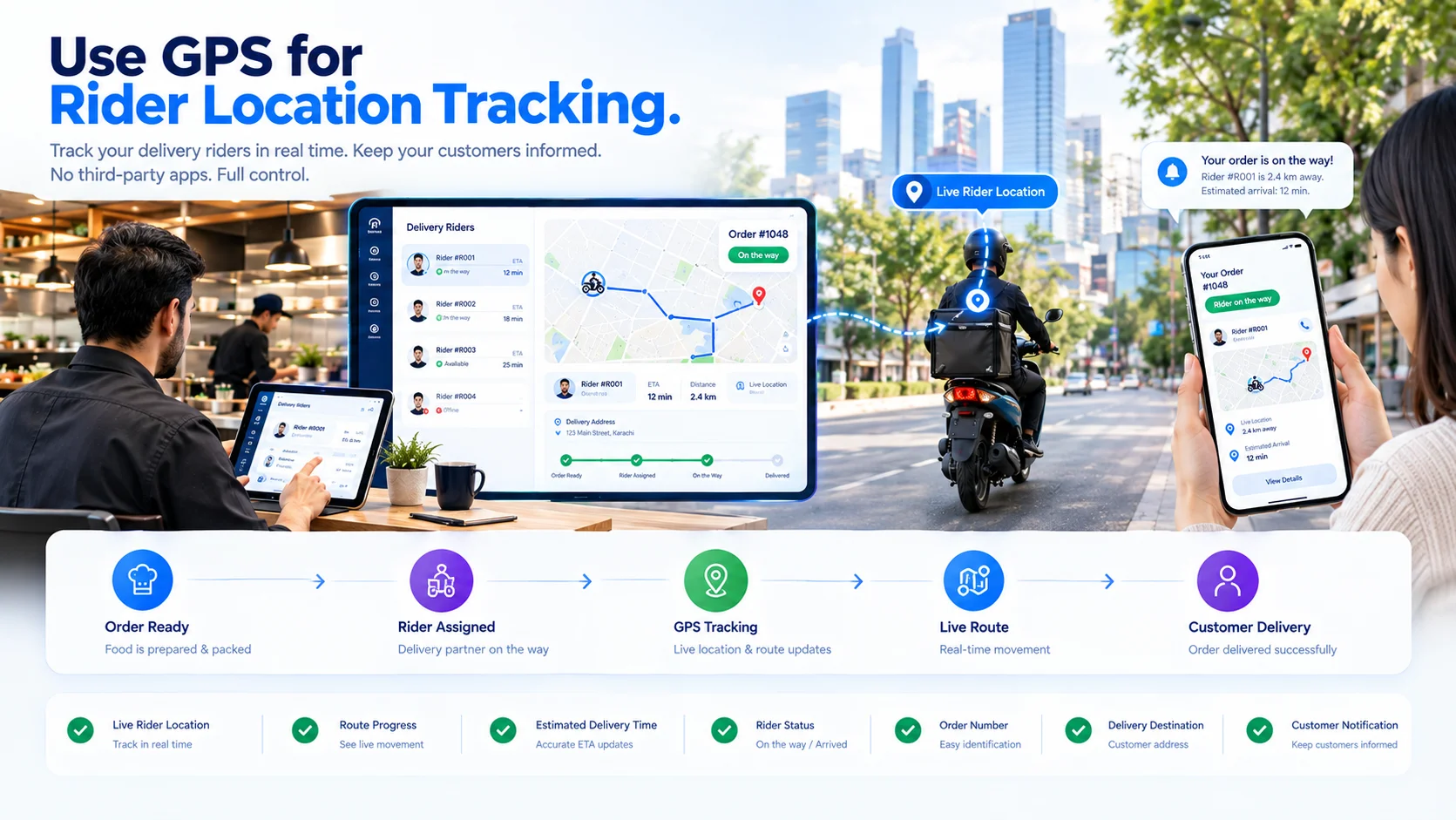
Use GPS for Rider Location Tracking Order-status tracking and live location tracking are related but separate functions. Status tracking shows the delivery stage, such as “Out for delivery.” GPS tracking uses the rider’s device location to show movement during the delivery. A restaurant-managed GPS workflow may involve:
  1. The rider accepts the assigned delivery.
  2. The rider’s device requests location permission.
  3. Location updates are sent while the delivery is active.
  4. The tracking page displays the rider’s approximate progress.
  5. Location sharing stops after delivery completion.
The system should define:
  • When location collection begins
  • How frequently the location is updated
  • Which employees can view it
  • What the customer can see
  • When location history is removed or retained
  • What happens when GPS or mobile data is unavailable
Restaurants should follow applicable privacy and employee-monitoring requirements when using rider location data.

Step 10: Calculate Estimated Arrival Times Carefully

An estimated arrival time may depend on:
  • Remaining preparation time
  • Packing time
  • Rider availability
  • Rider distance from the restaurant
  • Delivery distance
  • Current route
  • Traffic data
  • Multiple assigned deliveries
  • Weather or local disruption
A fixed estimate created when the order is placed may become inaccurate as conditions change. If the system supports updated estimates, the tracking page should clearly distinguish between:
  • Estimated preparation time
  • Estimated collection time
  • Estimated dispatch time
  • Estimated delivery time
Restaurants should avoid presenting an estimate as a guarantee when it can change during preparation or delivery.

Step 11: Notify Customers at Important Events

Customers usually do not need a message for every internal kitchen action. Notifications should focus on meaningful events, such as:
  • Order received
  • Order accepted
  • Collection time confirmed
  • Order delayed
  • Order ready for collection
  • Rider assigned
  • Order dispatched
  • Delivery completed
  • Order cancelled
Too many notifications can make the process difficult to follow. Too few can leave customers uncertain about whether the restaurant received their order. Each notification should link to the current tracking page rather than presenting information that may become outdated.

Step 12: Keep Tracking Connected to Payment Status

Tracking should not confuse fulfilment status with payment status. An order can be ready while payment is still pending. A delivery can also be prepaid or marked for payment upon delivery. The system may display payment as:
  • Payment pending
  • Paid online
  • Pay at collection
  • Pay on delivery
  • Payment failed
  • Refunded
Sensitive payment information should not appear on the public tracking page. Customers only need to know the relevant payment state and any action required.

Step 13: Handle Delays and Order Changes

Live tracking is useful only when it reflects changes accurately. Restaurants should define how the system handles:
  • Preparation delays
  • Unavailable items
  • Changed collection times
  • Address corrections
  • Rider reassignment
  • Failed delivery attempts
  • Customer cancellations
  • Restaurant cancellations
  • Refunds
If an item becomes unavailable, employees may need to contact the customer before preparation continues. If an order is delayed, the tracking page and customer notification should show the updated estimate. Leaving the original time unchanged can create unnecessary calls and collection-area congestion.

Step 14: Protect Customer and Rider Information

A tracking page may contain customer, restaurant and rider information. Access should therefore be limited. Recommended controls include:
  • Secure and non-predictable tracking links
  • Limited information on public pages
  • Expiring tracking access
  • Encrypted connections
  • Role-based staff permissions
  • Restricted rider-location visibility
  • Activity records for sensitive changes
  • Defined retention periods
  • Removal of tracking access after completion
Avoid displaying a customer’s complete address, telephone number or payment details on a page that can be opened by anyone with a simple order number. Rider information should also be limited to what the customer needs to receive the delivery.

What Customers Can See Without Installing an App
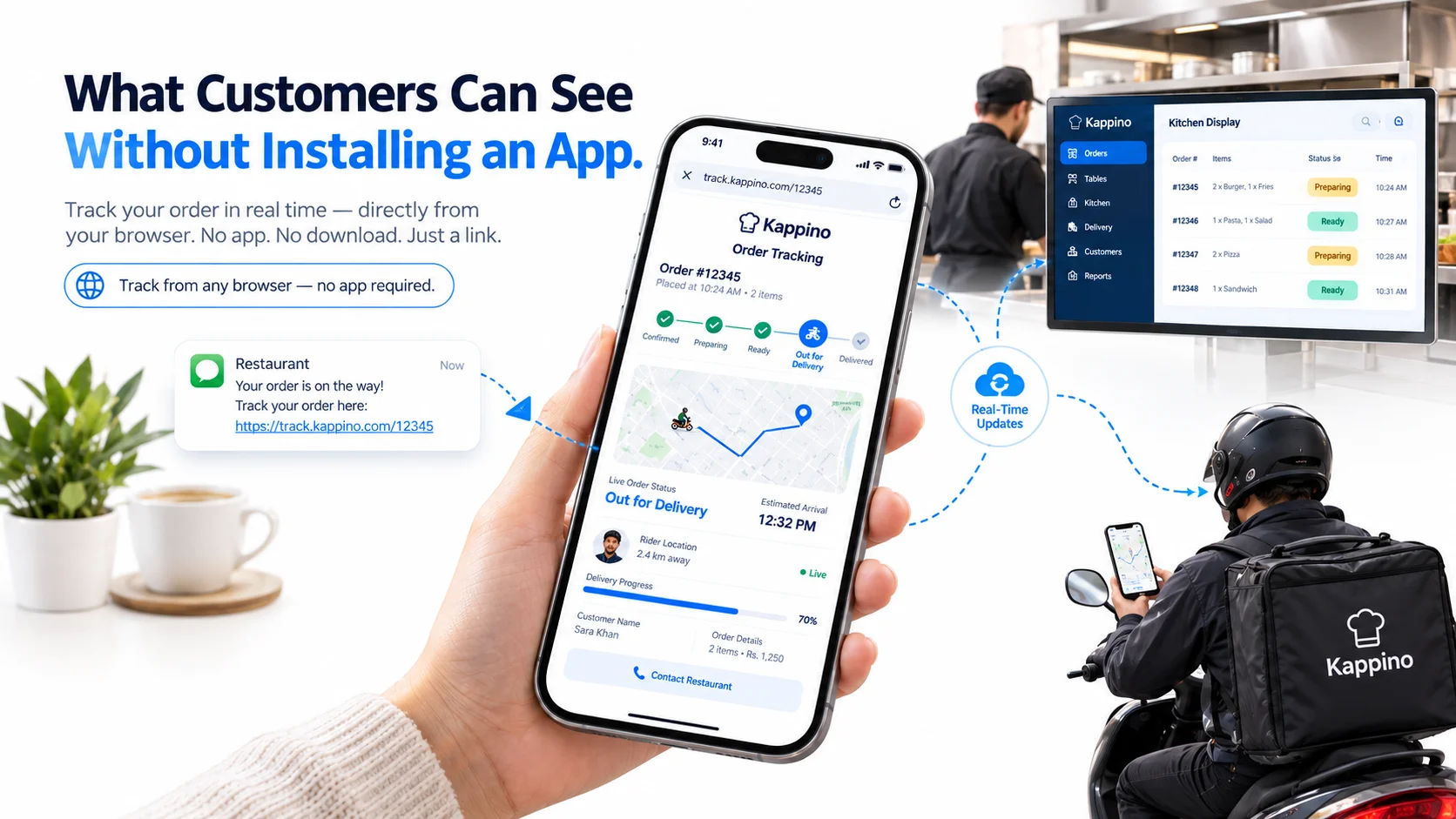
What Customers Can See Without Installing an App A browser-based order tracking page can provide many of the updates commonly associated with delivery applications. Depending on the restaurant’s system, customers may see:
  • Order confirmation
  • Preparation status
  • Estimated readiness
  • Collection instructions
  • Rider assignment
  • Dispatch status
  • Approximate rider location
  • Estimated arrival
  • Delivery confirmation
  • Restaurant contact options
Because the page opens in a browser, the customer can return to it from the original message without installing additional software.

What Restaurant Staff Can See

Employees require a more detailed operational view than customers. The internal dashboard may include:
  • All active orders
  • Order channel
  • Order type
  • Kitchen station progress
  • Preparation delays
  • Customer details
  • Payment status
  • Rider availability
  • Rider assignment
  • Delivery address
  • Location updates
  • Failed delivery attempts
  • Completed orders
Permissions should determine which roles can view customer addresses, rider locations, refunds and financial information.

Live Order Tracking vs Order Management

Order management controls the complete transaction. Live tracking provides visibility into its progress.
Order Management Live Order Tracking
Receives and organizes orders Displays the current order status
Routes items to kitchen stations Shows preparation progress
Handles edits and cancellations Communicates important changes
Coordinates payments Shows whether action is required
Assigns riders Displays dispatch progress
Closes the transaction Confirms collection or delivery
Tracking depends on accurate order management. If employees do not update the operational record, the customer-facing page cannot provide reliable information.

Benefits of Tracking Direct Restaurant Orders

Fewer Status Enquiries

Customers can check the tracking page instead of contacting the restaurant to ask whether an order is ready or on its way.

Clearer Collection Timing

Takeaway customers can wait for the ready status before travelling to the collection point.

Connected Kitchen and Delivery Updates

The same order record can move from kitchen preparation to rider dispatch without staff maintaining separate status notes.

Direct Customer Communication

The restaurant can provide order updates through its own website, email, SMS or WhatsApp-assisted workflow.

Consistent Order Records

Preparation, payment, collection and delivery events remain attached to the same order.

Operational Visibility

Managers can identify delayed preparation, rider waiting time and failed delivery handovers.

Common Live-Tracking Problems

Statuses Are Not Updated

If employees forget to update the order, the customer-facing information becomes inaccurate. Every status should have a clear owner and operational trigger.

Orders Are Marked Ready Too Early

The kitchen may complete the main item while drinks, sides or packaging are still missing. Use a final verification stage before notifying the customer.

Tracking Links Expose Too Much Information

The page should display only the information required to follow and receive the order.

Rider Location Continues After Delivery

Location sharing should end when the active delivery is completed or cancelled.

Estimated Times Never Change

When preparation or delivery is delayed, the system should update the estimate or provide a delay notice.

Customers Receive Too Many Messages

Use notifications for meaningful events and provide one tracking page for detailed progress.

The Tracking Page Requires an Account

Requiring registration can add unnecessary steps for customers who only want to check a single order. Secure guest tracking can provide access without a permanent account.

How to Set Up App-Free Order Tracking

Before launching live tracking, confirm:
  • Direct orders enter one order management system
  • Every order receives a unique identifier
  • Secure tracking links are generated
  • Customer contact details are collected correctly
  • Kitchen statuses match real preparation stages
  • Takeaway and delivery workflows are separated
  • Riders can update delivery progress
  • GPS permissions are controlled where location tracking is used
  • Customer notifications are configured
  • Delays and cancellations update the tracking page
  • Payment and fulfilment statuses remain separate
  • Personal information is protected
  • Completed tracking links expire where appropriate
  • Staff have practised complete order scenarios
Test the process using actual mobile browsers rather than checking the restaurant dashboard alone.

How Kappino Supports Live Restaurant Order Tracking
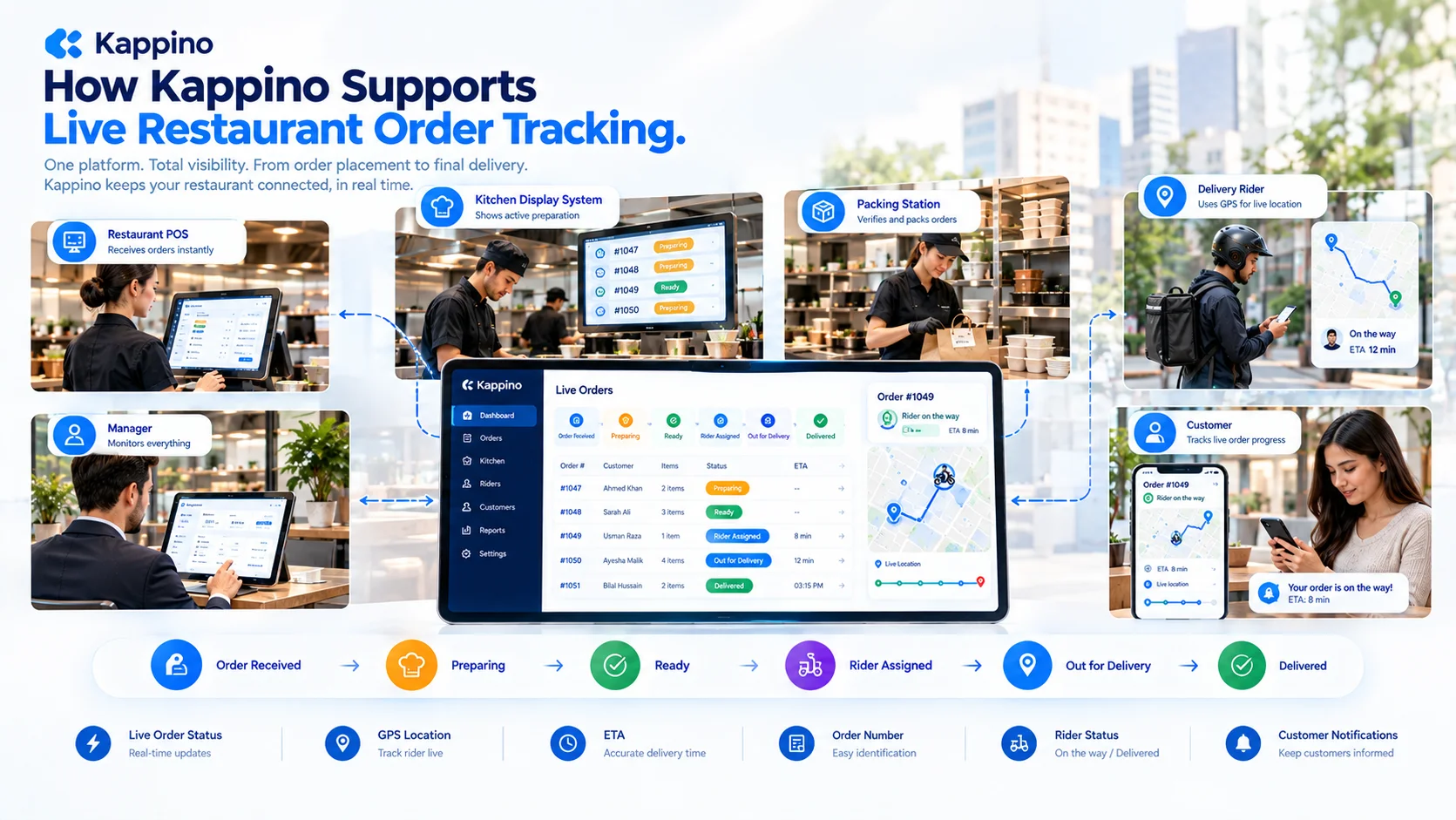
How Kappino Supports Live Restaurant Order Tracking Kappino connects order progress across the POS, kitchen, counter, rider and customer workflow. Restaurants can manage order statuses internally and provide customers with current information as the order moves through preparation, collection or delivery. This supports direct restaurant orders without requiring the customer to depend on a third-party delivery marketplace for every tracking update. Explore Kappino’s real-time order tracking system or learn how its restaurant order management system organizes the complete order lifecycle.
Frequently Asked Questions

Can customers track a food order without downloading an app?

Yes. A restaurant can send a secure tracking link that opens in a mobile or desktop browser. The page can display preparation, collection and delivery updates.

Can restaurants track deliveries without using a delivery marketplace?

Yes. Restaurants can manage direct deliveries through their own order, rider and tracking workflow. They still need suitable software, delivery staff or another fulfilment arrangement.

How does a restaurant tracking link work?

The link opens a page connected to one order. When authorized restaurant or delivery staff update the order, the page displays the latest customer-facing status.

Can telephone orders receive tracking links?

Yes. If the customer provides a supported mobile number or email address, the restaurant can create the order and send its tracking link after confirmation.

Can a customer see the rider’s live location?

This depends on the system’s capabilities and the restaurant’s configuration. If GPS tracking is enabled, the page may show the rider’s approximate location during an active delivery.

Does order tracking work for takeaway?

Yes. Takeaway tracking can show when an order is confirmed, being prepared, ready for collection and collected.

Is a tracking link safe?

It can be when the system uses a secure, difficult-to-guess reference, encrypted connections, limited information and appropriate expiration rules. A simple public order number should not provide access to sensitive customer information.

What happens if the rider loses internet access?

The tracking page may continue showing the last received location or status until the rider’s device reconnects. The interface should make it clear when location information is no longer current.

Is live order tracking the same as restaurant order management?

No. Order management controls the complete order lifecycle, including preparation, payment and fulfilment. Live tracking shows selected progress information to employees or customers.

When should a tracking link stop working?

The restaurant should define an expiration period based on its operational and privacy requirements. Public tracking access normally does not need to remain active indefinitely after collection, cancellation or delivery.

Conclusion

Restaurants can provide live order tracking without requiring customers to install a delivery application. A secure browser-based link can show order confirmation, preparation, collection, rider assignment and delivery progress. The information is updated through the restaurant’s POS, kitchen and delivery workflow. Reliable tracking depends on accurate internal statuses, clear staff responsibilities, secure access and timely customer communication. When these elements remain connected, restaurants can give customers useful live updates while managing direct takeaway and delivery orders through their own operation.