

Order Received
The order enters Kappino's restaurant order management system from the POS, the QR menu, your website or WhatsApp. It appears instantly on the order board and the kitchen display, and its timer starts the moment it lands.
Kappino is a real-time order tracking system built for restaurants, giving complete visibility into every order from the kitchen to the customer's door. Restaurants use this live order tracking software to manage orders efficiently, cut delivery delays, and keep kitchen, staff, and delivery teams coordinated at every step.
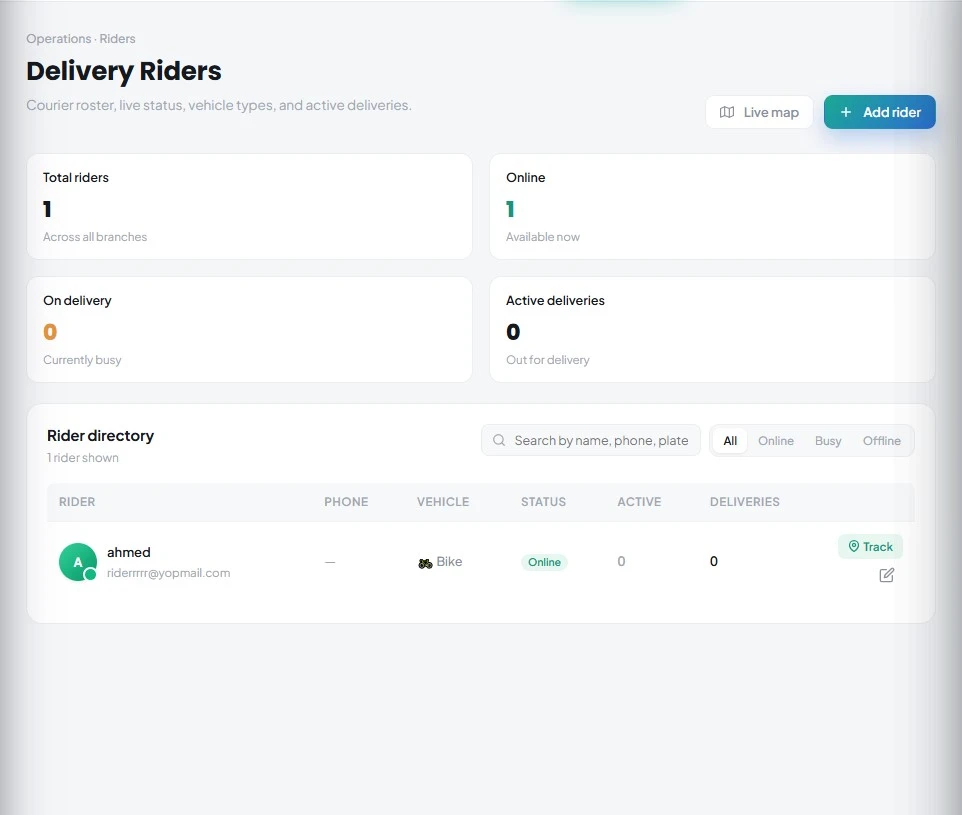
Real-time order tracking gives your kitchen team, your front of house and your delivery riders a continuous, accurate view of where each order stands at any given moment, through a live order status system built into the same platform your team already uses.
Every "Where is my order?" call takes a staff member away from their work. In a busy Friday service, these interruptions compound, slowing the kitchen. The delivery tracking software sits within a complete restaurant management platform, so every status update feeds the same system your staff use to take orders, manage stock, and record payments.
From a single high-street restaurant to a cloud kitchen or a multi-branch group across Italy or the wider European market, the live tracking system keeps last-mile delivery management synchronised without manual updates, phone checks, or status calls.
Kappino's restaurant order tracking software follows each order through clear stages, from kitchen ticket to doorstep delivery, with live status updates at every transition so your team always knows where things stand.
The order enters Kappino's restaurant order management system from the POS, the QR menu, your website or WhatsApp. It appears instantly on the order board and the kitchen display, and its timer starts the moment it lands.
The kitchen display system (KDS) picks up the ticket. As dishes move from new to preparing to ready, the live order status updates automatically on every screen.
The manager assigns a rider, with a suggested rider shown in the assign window, and the delivery appears in the rider's Kappino Rider app. The rider marks the order as collected and sets off.
The rider shares their GPS location from the Kappino Rider app, and it shows on the live map in Kappino, so the restaurant can see where each rider is without calling them. Rider and restaurant can message each other through the riders chat inbox.
The rider marks the order as delivered and attaches a proof-of-delivery photo in the app. The photo is stored against the order record, and the full order history is saved in Kappino for review and dispute resolution.
The Kappino Rider app, available on the App Store and Google Play, connects your delivery dispatch dashboard directly to every rider on the road, closing the loop between kitchen dispatch and confirmed doorstep delivery.
When a delivery order is ready to go, the manager assigns a rider from the list of available riders. Each rider gets their own login, created from the rider profile and sent by email, and the manager can resend it at any time.
The rider signs in to the Kappino Rider app and sees their assigned deliveries with the customer's address. They mark each order collected and delivered, so the restaurant always knows where it stands.
While riders are on the road, the app shares their location and the live map in Kappino shows where each one is. Open a single rider to follow their delivery from the restaurant to the customer.
Riders and the restaurant message each other in the app and the riders chat inbox, so questions about an address or an order are sorted out without phone calls.
On arrival, the rider attaches a proof-of-delivery photo inside the app. The photo is stored against the order with the time it was added, and managers can also add, replace or remove a proof photo from the order.
Kappino keeps only each rider's last known position, not a history of their routes, in line with Kappino's GDPR approach across the platform. The rider app is native to the platform: no third-party delivery integrations, no separate subscriptions. Restaurants operating at pace, whether fast food and QSR outlets or franchise delivery networks, get complete control over their restaurant delivery operations with real-time tracking built in.
Restaurant order tracking is not an operational luxury. It drives customer satisfaction, staff efficiency, and last-mile delivery performance. Order timings captured through Kappino's live order status system flow into restaurant performance analytics, including the average time to start preparation, to prepare and to hand off, turning delivery data into decisions your team can act on the same day.
Kappino's order tracking system covers every layer of your delivery operation, from kitchen prep to the final handover — including rider dispatch and proof of delivery.
Kappino's GPS tracking layer gives managers a live map view of active riders, with delivery status and proof-of-delivery records, built with GDPR principles at its core. The same data standards apply whether you are running a single site or a restaurant chain with locations across multiple cities.
Only the data needed for tracking is processed — no unnecessary personal data collection from riders or customers.
Riders share their location from the app, and it is used solely for operational tracking of deliveries.
Kappino stores each rider's last known location, not a history of where they have been.
Owners can export their data or delete their account from settings, and rider logins can be reset or removed at any time.
Choose the package that fits your restaurant operations and business needs.
Essential tools for small restaurants, cafés, and single-location businesses.
€99/ month
What's included:
Most popular plan
Advanced operational tools for growing restaurants.
€199/ month
What's included:
Advanced tools for multi-branch operations, integrations, loyalty, and AI.
€399/ month
What's included:
Prices are for business customers and exclude VAT and other applicable taxes, which are shown on your invoice. Prices per month. Final pricing may vary depending on setup, integrations, support requirements and business needs. Not sure which plan fits? Book a personalised demo
POS, orders, kitchen flow, inventory, reporting and AI tools built for modern restaurant operations.