
Kappino Dashboard — Today’s Service
Live
Orders Today
347
↑ 12% vs yesterday
Avg. Service Time
3:18
↓ 40s faster than last week
Revenue (Today)
€2,840
↑ 8% vs same day last week
Station #1 In Progress
Burger Combo ×2
Sent 01:42 ago
Station #2 Queued
Family Bucket + Sides
Sent 0:58 ago
Station #3 Ready
Spicy Wings ×12
Ready to pack

What Makes a Great Fast Food Management Software?

In a quick service restaurant, seconds translate directly into revenue. The right fast food management system doesn’t just record sales — it eliminates friction at every step: the till, the kitchen pass, the stock room, and the close-of-day report. Kappino was built specifically for these environments, where high order volume, short ticket times, and staff turnover are the daily reality.

Everything Your Fast Food Restaurant POS Software Needs

Purpose-built tools for quick service — not repurposed fine-dining software.

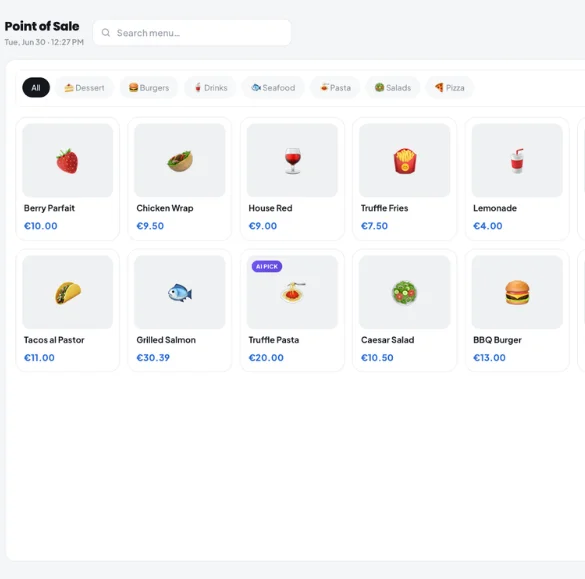
One-Tap Order Entry

A clean, visual POS interface lets staff place full orders in seconds. Colour-coded menu tiles, modifier shortcuts, and instant combo detection cut transaction time at the counter.

Kitchen Display System (KDS)

Orders fire directly from the POS to a kitchen display in real time. Priority colour-coding, elapsed-time alerts, and station routing ensure nothing sits cold or gets missed.

Real-Time Inventory Control

Every item sold automatically deducts from stock. Set low-stock thresholds per ingredient and receive alerts before you run out during a lunch rush.

Live Analytics & Reporting

Track hourly sales, best-selling items, average ticket size, and staff performance from any device. Make menu and staffing decisions based on real data, not gut instinct.

Flexible Payment Processing

Accept cash, card, contactless, and split payments without slowing down the queue. The fast food POS system handles multi-tender transactions in a single flow.

Staff & Shift Management

Assign roles, set permissions, and track hours directly in Kappino. New hires can be ready to take orders in minutes with the guided POS interface.

Combo & Modifier Engine

Build meal deals, upsell prompts, and item modifiers once. The fast food ordering system applies them automatically at the point of sale — zero manual calculation.

Cloud-Based, Always On

Kappino runs in the cloud with offline fallback. Internet outage? The fast food POS keeps processing orders and syncs automatically when the connection returns.

Multi-Location Management

Run one location or fifty from the same dashboard. Update menus, pricing, and promotions across all sites simultaneously — essential for growing fast food chains.

Counter service
88% Fast
Kitchen output
76% On target
Payment processing
94% Excellent
Queue wait time
2:40 Peak hour
Staff efficiency
83% Tracking

A Fast Food POS System That Keeps Up with Your Rush

Peak hours are where quick service restaurants win or lose customers. Kappino’s fast food point of sale is engineered for throughput — with a streamlined interface that requires minimal screen taps per order, and a backend that routes every ticket to the right station instantly.
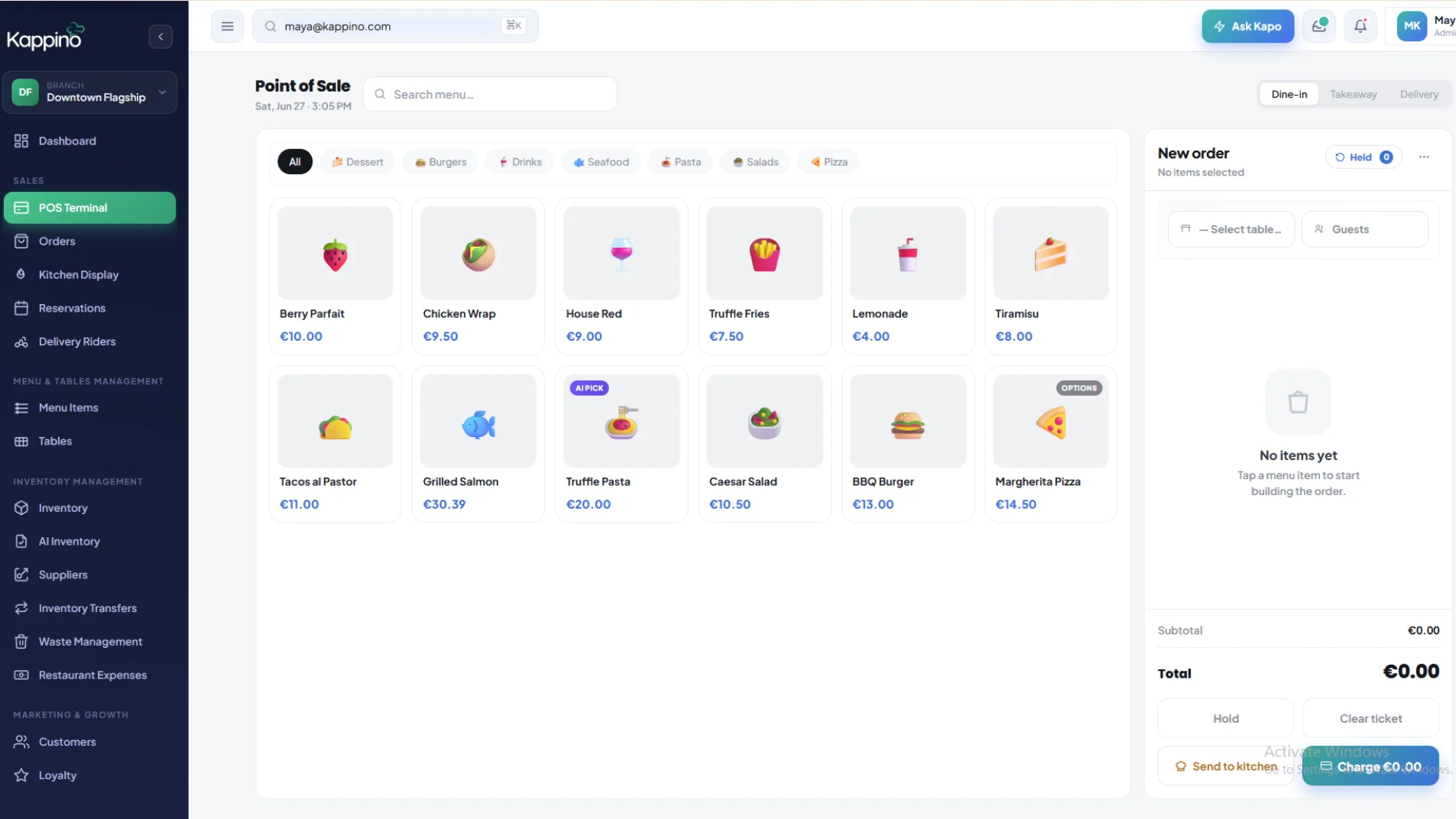
  • Visual menu grid designed for fast, accurate order-taking
  • Order routing fires to kitchen display in under 1 second
  • Live queue visibility reduces customer wait confusion
  • Automatic upsell prompts increase average spend without friction
  • Works on tablet, desktop, or dedicated POS hardware
Stock Alert — Today
Burger buns
Low
Chicken portions
Good
Frying oil
Moderate
Packaging cups
Good
⚠ Reorder Alert
Burger buns below threshold — reorder recommended before next peak

Fast Food Inventory Management That Stops Waste Before It Starts

Running out of a core ingredient mid-service is one of the most damaging things that can happen to a fast food restaurant. Kappino’s inventory module tracks stock depletion in real time against every order placed, so you always know where you stand.
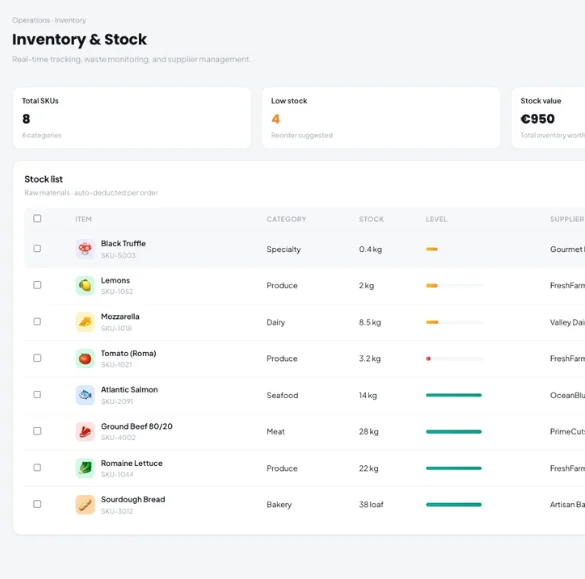
  • Auto-deduction of ingredients per recipe on every order
  • Configurable low-stock alerts per ingredient per location
  • Food cost calculation against live ingredient prices
  • Waste logging to identify loss points over time
  • Supplier purchase tracking within the same platform

A Complete Fast Food Restaurant Management System

Beyond the POS terminal, Kappino gives owners and managers the tools to run the whole operation from a single platform — no spreadsheets, no separate apps.

01

Sales Analytics

Break down revenue by hour, item, category, or staff member. Identify your most profitable menu items and your slowest hours so you can act on real patterns.

02

Promotions & Discounts

Build combo deals, happy hour discounts, and loyalty schemes directly in Kappino. Promotions apply automatically at the till — no staff training required.

03

Menu Management

Update prices, add seasonal items, and reorganise your menu layout from the dashboard. Changes push live to all terminals instantly across every location.

04

Shift & Cash Management

Open and close shifts with cash counts, track voids and discounts per cashier, and export end-of-day reports in one click.

05

Customer Data & Loyalty

Build a customer database, track visit frequency, and run targeted promotions to bring people back — all without a separate CRM tool.

06

Multi-Site Control

Manage menus, pricing, and reporting across multiple fast food locations from one account. The fast food chain management view consolidates everything in one place.

Built for Quick Service. Not Adapted for It.

Generic restaurant software forces fast food operators to work around features designed for sit-down dining. Kappino was built from scratch for counter service environments.

Designed for counter service, not table service

No floor plans, no course management, no complexity you don’t need. Every screen is optimised for fast food workflows.

Works on any device

iPad, Android tablet, Windows PC — Kappino runs on the hardware you already own. No proprietary terminals required.

Offline mode for uninterrupted service

Internet drops happen. Kappino keeps processing orders in offline mode and syncs everything automatically when the connection returns.

Setup in under an hour

Import your menu, connect your printer, train your staff. Most fast food operators are live on Kappino within the same day.

Scales with your growth

Whether you’re running one window or opening a second location, Kappino’s fast food restaurant management software scales without switching platforms.

Transparent pricing, no lock-in

Monthly subscription with no long-term contracts. Cancel anytime. Your data always belongs to you and can be exported at any time.

Frequently Asked Questions

What is fast food POS software and why does my restaurant need it?

A fast food POS software (point of sale) is the system your staff use to take orders, process payments, and route tickets to the kitchen. Unlike a basic cash register, a modern fast food POS system integrates with inventory, analytics, and staff management so you can run your entire quick service restaurant from a single platform. Without it, busy services lead to order errors, slow service times, and manual stocktaking that eats into your margins.

How is a fast food management system different from a regular restaurant POS?

A standard restaurant POS is typically built around table service — floor plans, course management, and extended ticket times. A fast food management system is optimised for high-volume, short-ticket-time counter service: rapid order entry, kitchen display routing, queue management, and combo/modifier logic. Kappino is purpose-built for QSR environments, not adapted from a sit-down restaurant platform.

What hardware do I need to run Kappino’s fast food POS system?

Kappino runs on standard hardware: iPad, Android tablet, Windows PC, or any modern browser. You can connect receipt printers, cash drawers, and kitchen display screens via standard peripherals. There is no requirement to purchase proprietary hardware — you can start with a tablet you already own.

Can Kappino manage inventory automatically for a fast food restaurant?

Yes. Kappino’s inventory module deducts stock in real time based on recipes linked to each menu item. Every time a burger, side, or drink is sold, the corresponding ingredients are automatically removed from stock. You can set per-ingredient alert thresholds, track food cost percentages, and log waste — all within the same fast food management software.

Does Kappino support multiple fast food locations?

Yes. Kappino’s multi-site dashboard lets you manage menus, pricing, promotions, and reporting across any number of locations from a single account. You can push menu changes to all sites simultaneously or manage each location independently — making it an effective fast food restaurant management system for growing chains.

What happens if my internet goes down during service?

Kappino includes a full offline mode. If your internet connection drops, the fast food POS system continues processing orders and payments locally. All data syncs to the cloud automatically when the connection is restored — ensuring your service is never interrupted by a connectivity issue.

Ready to Speed Up Your Fast Food Restaurant?

Join fast food operators already using Kappino to serve more customers, reduce waste, and manage their business with confidence.

Start Your Free Trial
Kappino-Logo