
Manage Every Restaurant Order from One Dashboard
Keep dine-in, counter, takeaway, delivery, and online orders connected in a single system. Your team always knows what needs to be prepared, served, or delivered, making busy shifts easier to manage.
A centralised restaurant order management platform that brings dine-in, counter, takeaway, and delivery orders together in one place — helping teams manage orders more efficiently while reducing manual work.
Modern hospitality operations are complex. Guests order at the table, at the counter, through your QR menu, on your website, and on WhatsApp, each channel creating its own stream of requests. Without a single, coherent order management system for restaurants, orders get missed, mistakes pile up, and your team burns precious time managing tablets instead of serving guests.
Kappino's restaurant order management system solves this by pulling every incoming order into one unified workspace. Staff sees everything clearly, kitchens receive orders instantly, and customers get accurate, timely service, every single time. Because it works as a genuine multichannel order management system, no order from any channel ever lands in a blind spot.
Restaurant order management software helps you organize every order in one place, reduce mistakes, improve kitchen communication, and deliver faster service. Whether you run a single restaurant or multiple locations, it keeps your daily operations running smoothly.
Keep dine-in, counter, takeaway, delivery, and online orders connected in a single system. Your team always knows what needs to be prepared, served, or delivered, making busy shifts easier to manage.
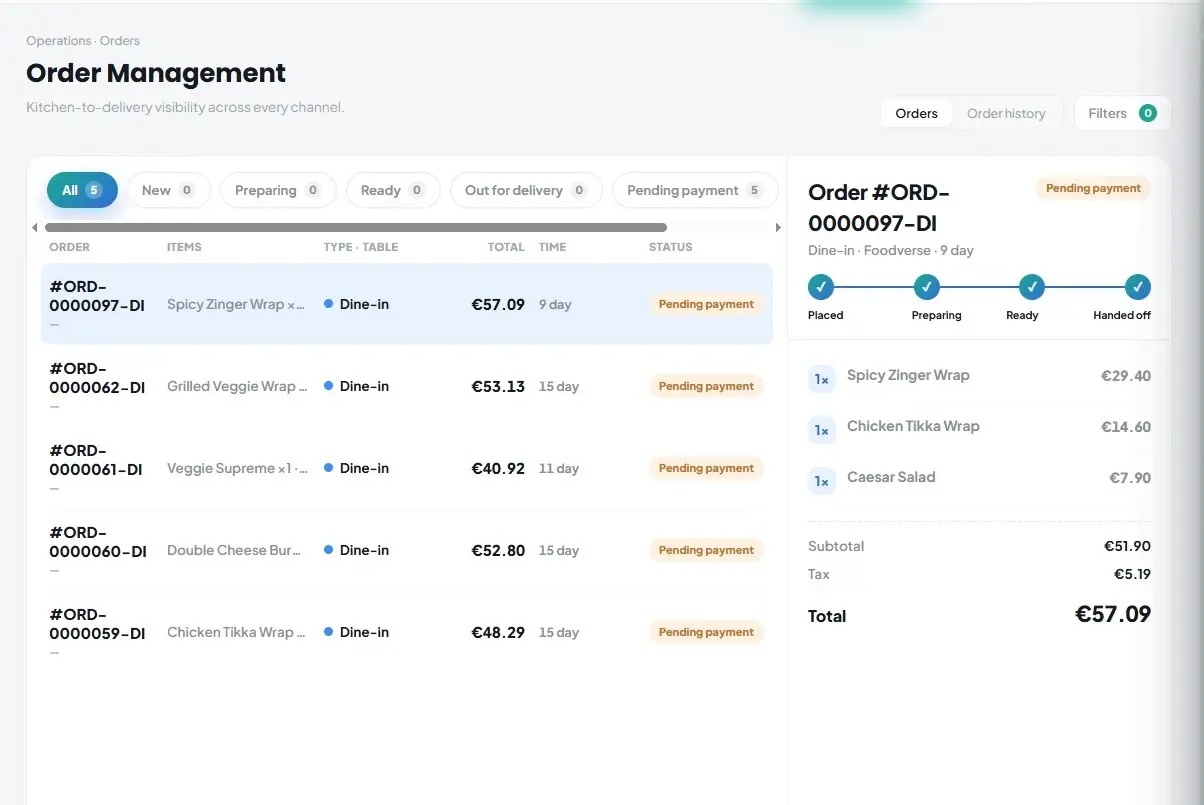
View dine-in, counter, takeaway, delivery, and online orders from one live board, with a badge showing which orders came from your website or your QR menu and WhatsApp. Staff no longer need to switch between different systems, helping them work faster and stay organized.
Send every order directly to your kitchen display or printer with complete order details. This minimizes mistakes, improves communication, and helps meals reach customers on time.
Monitor the progress of every order from placement to completion. Quickly identify delays, keep guests informed, and keep your kitchen and front-of-house teams working together efficiently.
A powerful order management software that eliminates complexity by combining every order into a single dashboard, one unified interface for all restaurant operations.
Tableside orders are captured and routed to the kitchen the moment they are placed.
Every takeaway order carries the guest's name, phone number and pickup time, so the kitchen and the counter know exactly when each bag needs to be ready.
Monitor delivery orders from the moment they are received, through rider dispatch, to handover with a proof-of-delivery photo.
Every team member — from front of house to the kitchen — can see the current status of any order instantly.
Cancel an order from the same hub and record the reason. Paid orders cannot be cancelled by mistake, and the kitchen display can cancel a ticket only before preparation starts.
Access a complete record of every order across all service types, and search it by order number, guest name or phone.
Orders change during service. Kappino lets your team correct them quickly while keeping a clean record for the kitchen and for your reports.
Reopen an unpaid order in the POS and add or change dishes. Only the new lines are sent to the kitchen, and the kitchen display marks them as added, while dishes already cooking or served stay as they are.
Managers can discard a single dish, with quantity, or a whole order, choosing a reason such as customer complaint, food returned, wrong item, staff input error or kitchen error, and adding a note. The order is kept for audit and removed from revenue.
Cancel an order and record why. Paid orders are blocked from cancellation so takings stay accurate.
Bin a ready or served order, or a single line, and it goes straight into Waste Management so losses are counted, not forgotten.
Four simple steps. Every order type. No manual intervention required.
Whether placed at the table, at the counter, through the QR menu, on your website, or on WhatsApp, every order enters the system the moment it is confirmed.
The order is automatically broken into station-specific tickets and sent to the right part of the kitchen without any manual input from front-of-house staff.
Staff and managers see live status updates on every screen as preparation progresses, and guests who ordered on WhatsApp get status messages as their order moves, eliminating the need for status chasing or guesswork.
Completed orders are logged with full transaction data, feeding your reporting dashboard so you can identify trends and improve operations continuously.
Monitor and manage all your restaurant locations from a single, powerful platform — without switching between systems.
Monitor all restaurant locations in one unified dashboard with real-time insights into orders, performance, and revenue without switching between systems.
Each branch keeps its own menu, prices, floor plan and online booking settings, while owners can switch between branches or view them all together from a central system.
Assign secure, role-based permissions for owners, managers, and kitchen staff at each location, ensuring controlled access and efficient multi-branch operations. One head office view. Every branch controlled. Kappino gives multi-location operators central visibility while still allowing each restaurant to keep its own menu, pricing, staff roles, and service settings, making it a strong fit for restaurants running more than one site.
Whether you run a single neighbourhood bistro or a national chain of 50 locations, Kappino's order management system scales to your order volume, your channels, and your operational complexity.
Compete with the big chains using the same order management software, without the enterprise price tag. Kappino gives solo operators a full restaurant order management system from the first service.
Run a true multi location order management setup with per-branch KPIs and an all-branches view. Compare sites and spot which locations need operational attention, all from one centralized order management dashboard.
In delivery-only models, margins are everything. Kappino's delivery order management system keeps every POS, QR, website and WhatsApp order in one queue, reducing overprep and food waste, while rider dispatch and a live rider map keep every delivery visible.
High volumes demand a high accuracy order management solution. Kappino's POS order management system handles counter, takeaway and delivery orders side by side, giving QSR operators the kitchen order management system they need to move fast without dropping tickets.
Maintain brand consistency with a franchise order management system that keeps every outlet on the same workflow. Franchise managers get an all-branches view of orders and revenue; individual operators get their own online order management system for day to day service.
Apply the same order management solution to event catering, meal kit operations, and branded food concepts. Kappino's multi channel order management software adapts to any food business with recurring or seasonal order patterns.
Built around the people who run the floor. Choosing the right order management system software changes how a restaurant runs day to day, not just how orders are recorded. Owners looking for software to manage orders across a growing business need something that supports the manager first, then the front of house, then the kitchen, in that order of priority.
A manager's day is built around exceptions: a slow ticket, a missed allergy note, a supplier delay. Kappino's order management system surfaces those exceptions the moment they happen instead of at the end of a shift. One dashboard replaces reports pulled from three separate apps, staffing and prep decisions are based on live order volume instead of guesswork, and errors get caught before food leaves the kitchen, not after a complaint.
A true multi channel order management software treats a table order, a QR menu order, a website order and a WhatsApp order as equally important, routing each one the same way instead of forcing staff to check four separate screens. Every channel feeds the same kitchen queue, no channel is treated as an afterthought, and reporting is combined across channels rather than fragmented by platform.
Because Kappino runs as a cloud based order management system, owners can check live performance from a phone at home, and staff can log in from any device on-site without special hardware. There is no local server to maintain or back up, updates roll out automatically, and access works the same across single sites and multi-branch groups. Every part of the order management system, from manager dashboard to kitchen routing, is native to the platform. Restaurants running single locations or multi-branch groups get the same order management software without switching tools.
Where the order actually gets made. Front-of-house tools only solve half the problem. A restaurant kitchen order management system has to keep pace with the pass, not just the till, which is why Kappino builds kitchen routing as a core layer rather than an add-on.
Every order entering the restaurant order management system is split automatically by station, so the grill, the fryer, and the cold section each see only the tickets that belong to them. There is no manual sorting by kitchen staff, tickets print or display in the order they're needed, and a bottleneck at one station doesn't stall the whole kitchen.
The features that matter most on a busy service are the ones staff never have to think about. Kappino's restaurant order management system features are built to disappear into the workflow rather than add extra steps: ticket timers that turn amber at 8 minutes and red at 15, a preparation order on each dish, and one tap to mark an item ready, visible instantly to front of house.
Every completed ticket feeds directly into reporting, so managers can see the average time to start preparation, to prepare and to hand off without pulling a separate report. This makes it easy to spot when service slows down, compare kitchen performance between branches, and use real timing data when planning staffing. Kitchen routing is native to the order management system, no third-party KDS integrations required. Restaurants operating at pace, whether fast food and QSR outlets or franchise kitchen networks , run every ticket through one connected system.
Choose the package that fits your restaurant operations and business needs.
Essential tools for small restaurants, cafés, and single-location businesses.
€99/ month
What's included:
Most popular plan
Advanced operational tools for growing restaurants.
€199/ month
What's included:
Advanced tools for multi-branch operations, integrations, loyalty, and AI.
€399/ month
What's included:
Prices are for business customers and exclude VAT and other applicable taxes, which are shown on your invoice. Prices per month. Final pricing may vary depending on setup, integrations, support requirements and business needs. Not sure which plan fits? Book a personalised demo
POS, orders, kitchen flow, inventory, reporting and AI tools built for modern restaurant operations.