

A Booking System Calendar That Stays Current
Every reservation, from every channel, in one view. Move between days or jump to a date, filter by status, and see bookings and covers for the day on any device.
- daily views
- status colors
- walk-ins
Kappino brings every table booking, walk-in, and online reservation into one simple panel. Your team can confirm, assign, and track guests in real time without losing a single request.
Live tables, walk-ins, guest notes, and seating status in one place.
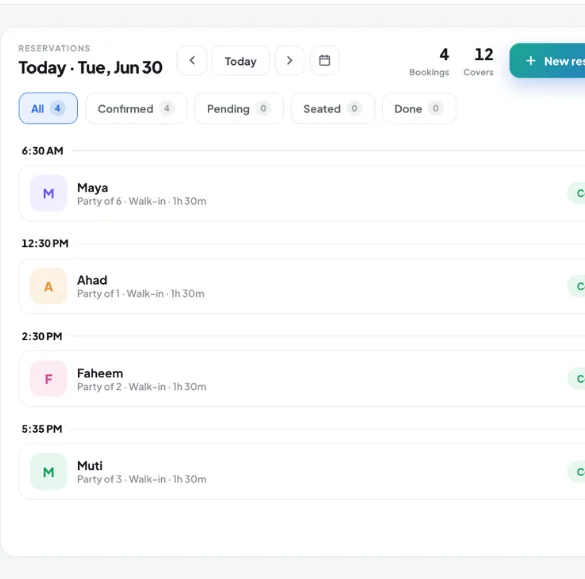
A reservation management system is more than a digital calendar. It is the control center of your dining room: it collects every booking, sorts it by channel, updates table availability in real time, and tracks each guest from the moment they book until they leave.
With a paper diary, you risk double bookings, lost phone messages, and staff who do not know what is coming next. With a real booking system , your team sees everything on one screen — tablet, phone, or desktop — and can react instantly to any change during service.
Kappino is a reservation software system built for restaurants of every size: simple for staff, detailed for managers, and connected to your POS, your order management, and your floor plan. From the booking calendar to the Kappino app, it runs on one platform.
From the digital calendar to the online booking page, from the floor map to booking confirmations, every part of the booking cycle runs through one panel.
Every reservation, from every channel, in one view. Move between days or jump to a date, filter by status, and see bookings and covers for the day on any device.
Guests book from a booking page you share on your website, Google Business profile or social channels at any hour. The page is available in 5 languages, and each request lands in the calendar automatically as pending.
An interactive floor map shows table status, assigns reservations, and helps you turn tables faster during busy shifts.
Guests get an email when their request is received, when you confirm it and if it is cancelled, and managers get an email alert for every new online booking.
Managers handle reservations away from the restaurant in the Kappino app for iOS and Android, or in any browser, with the same live booking list.
Every booking carries the occasion, the guest's notes and any special requests, so your staff is prepared before the guest walks in.
Guests find you on Google, on your website, on Instagram. With Kappino's online booking page and QR code, they send a request directly from those channels — no phone call, no app to download — in English, Italian, German, French or Spanish.
Every request flows into the same booking calendar. Your team sees it right away, can respond, assign a table, and send the confirmation — all from one panel, even on a phone.
Request sent · Awaiting confirmation
Every reservation request can be reviewed, assigned, changed, or confirmed from one controlled manager workflow.
Channel, time, party size, guest notes, and special requests arrive in one clean review lane.
The manager checks availability, party size, seating area, special requests, and how full the floor is.
Once reviewed, the booking is confirmed, reassigned, or changed safely. Kappino lets the floor manager check every reservation before it gets confirmed to the guest. This matters most during peak hours, for VIP guests, large groups, or when the dining room is nearly full: the manager reviews the request, picks the right table, then sends the confirmation. It is not extra paperwork. It is how every guest ends up at the right table, how the workload stays balanced between servers, and how special requests get handled with no surprises mid-service.
A clear flow, from the guest’s first request to a confirmed, assigned table.
From your booking page on the website, Google Business or social media, or by phone and entered by staff. Every channel lands in one calendar.
Checks time, party size, special notes, and floor availability.
Picks the right section on the digital floor map and assigns a table.
Example booking request moving through Kappino’s reservation workflow.
A confirmation email goes out with the full booking details.
On the day, everything is ready. Staff already know who is coming and where.
As soon as a guest sends a request from your booking page, they get an email confirming you have received it, and the page shows them a booking reference.
When your team confirms the reservation, the guest gets an email with the date, time and party size. No confusion, no second-guessing.
If a booking is cancelled, the guest is told by email, and the table is free again in your calendar.
Switch online bookings on or off, set up to three service periods, a party-size limit, slot length, minimum notice and how far ahead guests can book.
Mark a guest as a no-show in one tap, so your team can see which bookings did not turn up.
Manage reservations for every restaurant from a single panel. Each location keeps its own calendar, floor map, and managers.
Each restaurant can manage its own booking page, calendar, tables, guest notes, and managers — while owners can switch between branches or view them all together.
Choose the package that fits your restaurant operations and business needs.
Essential tools for small restaurants, cafés, and single-location businesses.
€99/ month
What's included:
Most popular plan
Advanced operational tools for growing restaurants.
€199/ month
What's included:
Advanced tools for multi-branch operations, integrations, loyalty, and AI.
€399/ month
What's included:
Prices are for business customers and exclude VAT and other applicable taxes, which are shown on your invoice. Prices per month. Final pricing may vary depending on setup, integrations, support requirements and business needs. Not sure which plan fits? Book a personalised demo
POS, orders, kitchen flow, inventory, reporting and AI tools built for modern restaurant operations.